


Collaboration Center
3.85.00 Reviews
App Specs
- Version
- 1.9.0
- Updated On
- License
- Free
- Downloads
- 10,000+
- Developer
- IntercontinentalExchange, Inc
- Categories
- House & Home
- Platform
- Android
Screenshots
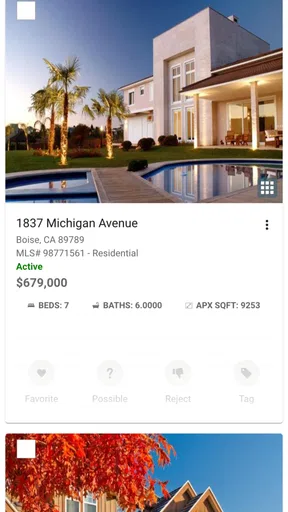

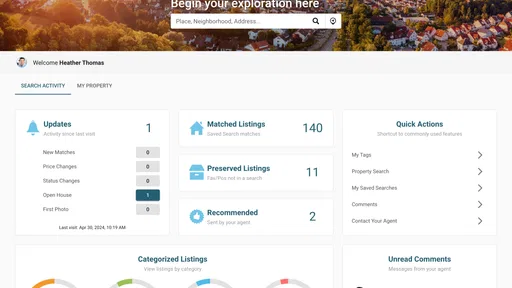
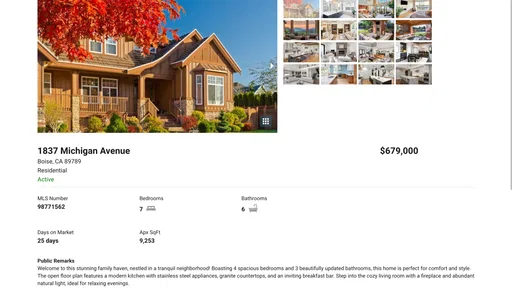
 Analysis by AppCompare
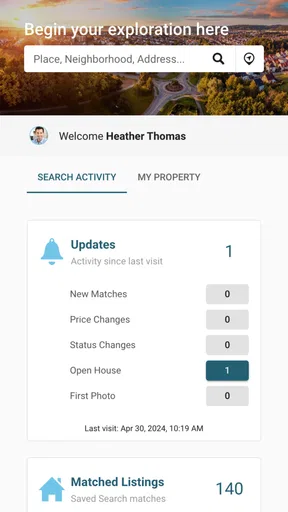
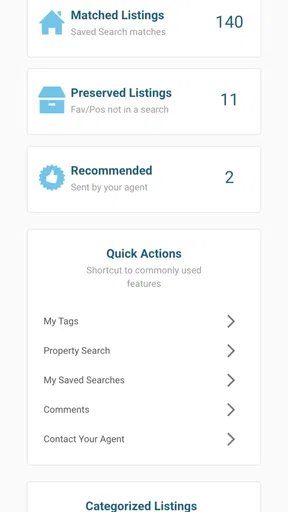
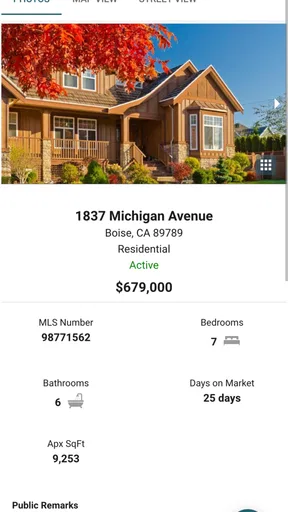
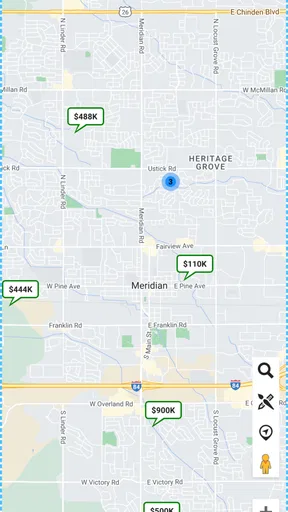
Finding a home is rarely a single search. It is usually a moving conversation between buyers, renters, agents, family members, and sometimes a lender or property manager. Collaboration Center is built around that shared part of the process rather than treating home hunting as a private list of bookmarks. I reviewed it as a free House & Home app from IntercontinentalExchange, Inc., and my main impression is that its value depends less on casual browsing and more on whether you have other people involved in a property decision.
The store summary presents it as a way to find a suitable home, while the short description focuses on collaboration. That distinction matters. I would not approach this as a complete replacement for every property-search service. I see it more as a workspace for keeping a home search coordinated, especially when opinions, questions, and next steps need to stay connected. Its strongest idea is shared decision-making, not simply displaying homes.
How the app feels during an ordinary home search
My first test for an app like this is simple: can I understand its purpose quickly enough to use it when I am already busy? Collaboration Center has a clear place in the House & Home category, and its name sets an expectation that the app is meant to bring people together around a property search. That makes it easier to imagine using it with a partner, a parent helping with a move, or an agent guiding several options.
The sensible way to approach it is to begin with a specific search goal instead of opening it with no plan. Decide whether you are comparing homes for yourself, helping someone else, or coordinating a group. Then use the app as the central point for that conversation. This avoids a common problem in property hunting: one person sends listings by message, another keeps notes elsewhere, and everyone remembers a different version of the discussion.
I would also set expectations about speed. A home-search workspace can feel responsive when you are checking a small number of possibilities, but the overall experience may depend on the amount of information being handled and the quality of the connection around you. I would not judge it only by how quickly the first screen appears. The more important question is whether moving from one property decision to the next feels orderly rather than confusing.
That is where the app’s collaboration angle can be useful. If you are comparing homes with another person, the time saved may come from fewer repeated explanations rather than from faster tapping. Instead of saying, “Which one did I send you yesterday?” you can keep the discussion tied to the same search context. For me, that is a more meaningful measure of performance than a dramatic loading animation.
A realistic scenario: coordinating a move with family
Imagine that I am moving to another city while a family member helps me evaluate homes. I might be available during the evening, while that person checks options during the day. A normal messaging app would let us exchange links, but it would not necessarily keep the search organized. Collaboration Center makes more sense in this situation because the discussion itself is part of the task.
Worth Reading Before You Choose

EA SPORTS FC Mobile 26 Is a Bigger Football Game, but It Takes Time

Flipboard Shows What News Apps Must Do Beyond the Feed

Switching to Android Auto Means Rethinking Your Driving Routine

Google Calendar Makes a Crowded Week Easier to Manage

Ludo King Makes the Most of the Minutes Between Plans

Baby Panda World Brings Quick Play to Modern Phones, but Its Game Library Feels Busy
I would use it to establish a short group of homes worth discussing, then ask the other person to react to practical concerns: distance, layout, suitability for daily routines, or whether a particular option deserves a viewing. The useful habit is to separate “interesting” from “ready to act on.” That small distinction prevents every attractive listing from becoming an urgent conversation.
There is also a less obvious benefit to involving another person early: it exposes disagreements before they become expensive. One person may focus on appearance, while another notices whether the home fits commuting or household needs. A shared workspace can make those differences visible sooner. The app cannot make the decision for you, but it can give the decision a clearer shape.
My advice is to keep the group focused. Adding everyone who might have an opinion can make a home search slower, not faster. Use the app with the people who genuinely influence the decision, and agree on what kind of response is useful. A quick preference, a question for an agent, and a final decision are different kinds of feedback and should not be treated as interchangeable.
Where perceived speed matters most
In a property app, speed is not only about opening screens. It also affects whether a conversation stays alive. If I am comparing homes with someone who is available for only a few minutes, delays can break the flow. If I am reviewing options alone, a slower moment is less serious because I can return later.
That leads to a practical distinction. Collaboration Center is likely to feel most valuable when the search has a moderate number of active choices and several people need to stay aligned. It is less compelling when I am only browsing casually or when I already have a highly efficient personal system. In those cases, the collaborative layer may feel like an extra step rather than a shortcut.
I would also avoid opening it for the first time immediately before an important appointment or viewing. A better approach is to explore the workflow in advance, understand how you want to organize the search, and then use it during the active phase. That is not a criticism unique to this app; it is good practice for any tool that becomes part of a time-sensitive decision.
What happens during heavier use
Heavy use in Collaboration Center does not necessarily mean leaving it open all day. For me, the demanding moments are more likely to come when several people are reviewing homes, when the search changes direction, or when many questions need to be resolved in a short period. Those are the moments when a collaboration tool proves whether it is genuinely helping or merely adding another place to check.
A useful workflow is to narrow the search in stages. Start broadly enough to understand the available choices, then reduce the list before asking everyone for detailed input. If every participant comments on every possibility, the app can become a stream of reactions instead of a decision tool. I prefer a shortlist that has already passed basic checks, followed by focused discussion about the remaining options.
This approach also helps with device resources. Any app used alongside maps, browsers, calls, and messaging can contribute to a busy phone experience, especially during a long day of viewings. I would not keep unnecessary apps active while using it. Closing unrelated tasks before a property-search session is a simple way to reduce distractions and make the phone feel more responsive, regardless of the device.
On a newer phone, I would expect the app to be easier to use alongside other home-search tools. On an older or more limited device, I would be more careful about multitasking. That does not mean the app is unsuitable for older hardware; it means the surrounding workflow matters. If I need to switch constantly between several demanding apps, the overall experience may feel less smooth than using Collaboration Center on its own.
Another heavy-use issue is mental rather than technical. Collaboration can create too many opinions. My tip is to assign each participant a role for a particular stage: one person checks practical fit, another raises questions, and the main decision-maker makes the final call. This keeps the shared process useful without turning the app into an endless voting exercise.
Stability and recovery when the process is interrupted
Home searches are full of interruptions. I may receive a call while reviewing a property, lose my connection in a building, or close the app because something urgent comes up. A reliable collaboration tool needs to let me return to the task without making me reconstruct the entire conversation from memory.
My recommendation is to treat the app as one part of a broader record until you are comfortable with your routine. For important decisions, I would keep essential appointment details and personal notes in a dependable place as well. That is not because Collaboration Center is necessarily unreliable; it is because property decisions can have consequences, and a single app should not be the only place where critical information exists.
If the app appears to pause or behave unexpectedly, I would first check the connection, give the screen a moment, and then reopen it rather than repeatedly tapping. During a busy search, impatient repeated actions can make it harder to tell what was actually completed. A calm recovery routine is especially useful when several people are waiting for an update.
I also prefer making decisions in small, clear steps. Finish one action, confirm that the group understands it, and then move to the next. This reduces confusion if an interruption occurs. For example, first identify the home being discussed, then record the question, then decide who will follow up. That structure is more resilient than sending a vague message and hoping everyone interprets it the same way.
The application has a current version of 1.9.0, which is worth checking before relying on it for a concentrated search period. Keeping an app current can improve compatibility and reduce avoidable friction, although an update should not be installed at the last minute before an important meeting unless I have time to test the workflow again.
Device constraints and who should be careful
Collaboration Center supports Android 7.0 and later, so it is accessible to people using a broad range of Android phones. That minimum requirement is helpful if a household does not share the same device age. Still, operating-system compatibility is only the first check. The practical experience will also depend on how well the phone handles switching between property information, calls, maps, and other everyday tasks.
I would recommend it most confidently to users who have a clear collaborative need: couples comparing homes, families helping with a move, or people who want a more structured way to discuss options. It may also suit someone who dislikes scattering property conversations across several messaging threads. The free price removes an obvious barrier to trying it, which is useful when you are still deciding whether a shared workflow is worth adopting.
I would be more cautious if I were searching alone and already comfortable with a browser, notes app, and ordinary messages. In that situation, Collaboration Center may not save enough effort to justify changing habits. The same applies if your main need is advanced property research, detailed financial planning, or a complete transaction process. I would choose a tool designed specifically for that job rather than expecting this app’s collaboration focus to cover everything.
The Everyone content rating also makes it approachable for a general household audience. Even so, a family should still decide what personal information belongs in a shared space. Home searches can involve addresses, budgets, schedules, and private preferences. I would keep sensitive details limited to the people who need them and avoid treating a convenient collaboration area as a substitute for careful judgment.
How it compares with familiar alternatives
The most obvious alternative is a standard property-search website or app used alone. Those services are often better when my priority is discovering a large range of homes and filtering by personal criteria. Collaboration Center has a different appeal: it is more relevant after the search becomes a conversation. If I only need to browse, a conventional search tool may be the faster choice. If I need to compare and coordinate, this app becomes more interesting.
A second alternative is a group chat. Messages are familiar and quick, but property discussions can become difficult to follow once several homes are involved. Links, opinions, questions, and decisions can appear in the wrong order. Collaboration Center’s reason for existing is stronger when I want the home search itself to remain the center of attention rather than one topic among dozens in a chat.
Notes and spreadsheet apps offer control and flexibility. They are excellent for building a custom comparison system, especially if I want my own columns for travel time, household priorities, or estimated costs. Their weakness is that they can require more manual organization and may not feel natural to everyone in the group. I would choose them when detailed personal analysis matters more than a guided shared experience.
Finally, direct communication with an agent remains important. No app can replace questions that require professional clarification or an in-person assessment. I see Collaboration Center as a way to make those conversations better prepared, not as a substitute for them. Before contacting an agent, I would use the shared workflow to agree on the exact question and identify which home it concerns. That small preparation can prevent vague follow-ups and duplicated requests.
Practical habits that make the app more useful
My first tip is to create a decision vocabulary before the search becomes busy. Use simple labels in conversation such as “keep,” “question,” and “drop,” even if the app does not impose those exact labels. The point is to distinguish curiosity from genuine interest. Without that distinction, every participant may assume that a casual reaction means the group should take action.
My second tip is to review the shared search at a fixed moment rather than responding constantly. A short daily or evening check can be more effective than interrupting work for every new possibility. This is especially helpful when the app is being used by people in different routines. It reduces notification fatigue and gives the group a predictable time to make decisions.
My third tip is to record the reason behind a choice, not only the choice itself. “Not suitable” is easy to forget. “Not suitable because the layout does not work for the household” is more useful when the search expands again later. This turns the app from a stream of preferences into a learning record, helping you avoid reconsidering the same unsuitable options.
My fourth tip is to separate technical recovery from decision recovery. If the app needs to be reopened, first restore the screen or search context, then confirm with the group what was completed. Do not assume that a draft message, selection, or update went through simply because you tapped it. This habit protects the group from acting on different versions of the same decision.
My fifth tip is to use it before a viewing, not only after one. Agree on what each person wants to inspect, then return afterward to compare the experience with the original expectations. That before-and-after comparison can reveal whether the group is being influenced by presentation alone. It also makes the app useful for learning what matters in real homes rather than just reacting to attractive listings.
Who will appreciate it and who should skip it
I think Collaboration Center is a sensible experiment for people whose home search includes other decision-makers. Its free access makes it easy to test without committing money, and its purpose is distinct enough from ordinary browsing to justify a trial when conversations are becoming messy. The Android support beginning with version 7.0 also means many users will not need a recent phone simply to install it.
I would skip it if I want a powerful solo research tool, a financial calculator, or a complete replacement for direct property services. I would also skip it if my search is so simple that I can manage it comfortably with one browser tab and a short note. Adding a collaboration layer to a problem that does not need collaboration is not progress; it is extra maintenance.
The modest store response so far gives me a reason to keep expectations measured: the app has a 3.8 average from around twenty ratings and has passed ten thousand installs. Those figures suggest an early, relatively small user base rather than a mature household standard. I would try it on a low-stakes search first, learn how it fits my routine, and only then make it central to a major move.
Its Everyone rating and free availability make that cautious trial straightforward. The release date was June 21, 2024, so I would judge it as a comparatively young product and allow room for the workflow to evolve. That is not automatically negative, but it does mean I would value simplicity and dependable habits over assuming that every part of the experience is already polished for every kind of search.
My performance verdict
After looking at Collaboration Center through the lens of speed, heavier use, stability, and device demands, I see a focused tool rather than an all-purpose home platform. It should make the most sense when several people need to stay aligned, particularly during the comparison stage between discovering homes and taking concrete next steps.
Its performance value is therefore measured in reduced confusion. A fast screen is nice, but a clear shared process is more important when a property search stretches across days or involves people who are not together. The app earns its place when it helps a group remember what it is considering, why an option matters, and what needs to happen next.
I would recommend trying it to couples, families, and other small groups who are tired of losing property discussions in ordinary messages. I would not recommend replacing every familiar search, note, or professional service with it. Use it as the collaboration layer, keep critical information organized, and give the workflow a small test before depending on it for a major decision.
Overall, I find Collaboration Center more promising for coordinated home hunting than for casual browsing. Its free House & Home offering from IntercontinentalExchange, Inc. has a clear audience, and the current 1.9.0 release is easy to consider on compatible Android devices. If your real problem is keeping people and decisions together, this is worth trying; if your problem is simply finding more listings, a conventional property-search option may serve you better.
Pros
- Centralizes team discussions
- files
- and tasks in one workspace.
- Supports real-time collaboration for faster project updates.
- Helps organize work with shared calendars
- notes
- and task lists.
- Useful notifications keep users informed about important changes.
- Accessible across devices
- making remote teamwork more convenient.
Cons
- The interface may feel overwhelming for first-time users.
- Some advanced collaboration tools may require a paid plan.
- Frequent notifications can become distracting without careful settings.
- Performance may depend heavily on internet connection quality.
- Limited integrations could be inconvenient for teams using other services.
FAQs for Collaboration Center
What is Collaboration Center, and what can I use it for?
Collaboration Center is designed to help teams communicate, organize shared work, and keep project information in one place. Depending on the version and services connected to it, you may be able to participate in discussions, share files, follow tasks, receive updates, and coordinate with other members. It is most useful for workplaces, study groups, and organizations that need a central space for collaboration.
Is Collaboration Center free to download and use?
The application may be available to download at no initial cost, but some features can depend on your organization’s subscription, account type, or connected services. Before installing it, check the official store listing and your administrator’s instructions for pricing details. In-app access may be restricted if your company or institution has not activated the required Collaboration Center plan.
Do I need an account or invitation to use Collaboration Center?
In most cases, you need to sign in with an existing account provided by your organization, workplace, school, or another supported service. Some installations may require an invitation, workspace code, or administrator approval before you can join a team. If you download the app without valid credentials, you might only reach the login screen and be unable to use its collaboration tools.
Does Collaboration Center work on both Android and iPhone?
Collaboration Center may be offered for Android and iOS, but supported devices and operating-system versions can vary. Check the Google Play Store or Apple App Store listing before downloading to confirm compatibility with your phone or tablet. Keeping the operating system and application updated is also recommended, since older versions may experience login problems, missing features, or reduced performance.
Is my information safe when using Collaboration Center?
You should review the application’s privacy policy and the rules established by your organization before sharing confidential information. Collaboration platforms commonly handle account details, messages, files, device information, and usage data. Use a strong password, enable available security features, avoid sharing sensitive files in the wrong workspace, and contact your administrator if you notice unfamiliar activity or an unexpected access request.


